<?xml version="1.0" encoding="utf-8"?><feed xmlns="http://www.w3.org/2005/Atom" ><generator uri="https://jekyllrb.com/" version="4.3.3">Jekyll</generator><link href="https://www.leonelngande.com/atom.xml" rel="self" type="application/atom+xml" /><link href="https://www.leonelngande.com/" rel="alternate" type="text/html" /><updated>2024-08-14T11:35:36+00:00</updated><id>https://www.leonelngande.com/atom.xml</id><title type="html">Leonel Elimpe</title><subtitle>I'm a Cameroon 🇨🇲 based freelance web developer and Internet entrepreneur, currently focusing on frontend technologies.</subtitle><author><name>{&quot;name&quot;=&gt;nil, &quot;picture&quot;=&gt;nil, &quot;email&quot;=&gt;nil, &quot;twitter&quot;=&gt;nil, &quot;links&quot;=&gt;[{&quot;title&quot;=&gt;nil, &quot;url&quot;=&gt;nil, &quot;icon&quot;=&gt;nil}]}</name></author><entry><title type="html">Safely Ignore Platform Requirements using Composer v2</title><link href="https://www.leonelngande.com/safely-ignore-platform-requirements-using-composer-v2/" rel="alternate" type="text/html" title="Safely Ignore Platform Requirements using Composer v2" /><published>2021-12-16T00:00:00+00:00</published><updated>2021-12-16T07:23:03+00:00</updated><id>https://www.leonelngande.com/safely-ignore-platform-requirements-using-composer-v2</id><content type="html" xml:base="https://www.leonelngande.com/safely-ignore-platform-requirements-using-composer-v2/"><![CDATA[<p>I’ve learned the hard way that blindly using Composer’s <code class="language-plaintext highlighter-rouge">--ignore-platform-reqs</code> can lead to issues like the downloading of package versions that are not compatible with your PHP version. I am on PHP 7.4 but packages using PHP 8 features were being downloaded, leading to this error:</p>

<p><code class="language-plaintext highlighter-rouge">syntax error, unexpected '|', expecting variable (T_VARIABLE)</code></p>

<p>It is safer to specify the platform requirement you would like to ignore using the <code class="language-plaintext highlighter-rouge">--ignore-platform-req</code> option of Composer v2:</p>

<p><code class="language-plaintext highlighter-rouge">composer install --ignore-platform-req=ext-pcntl</code></p>

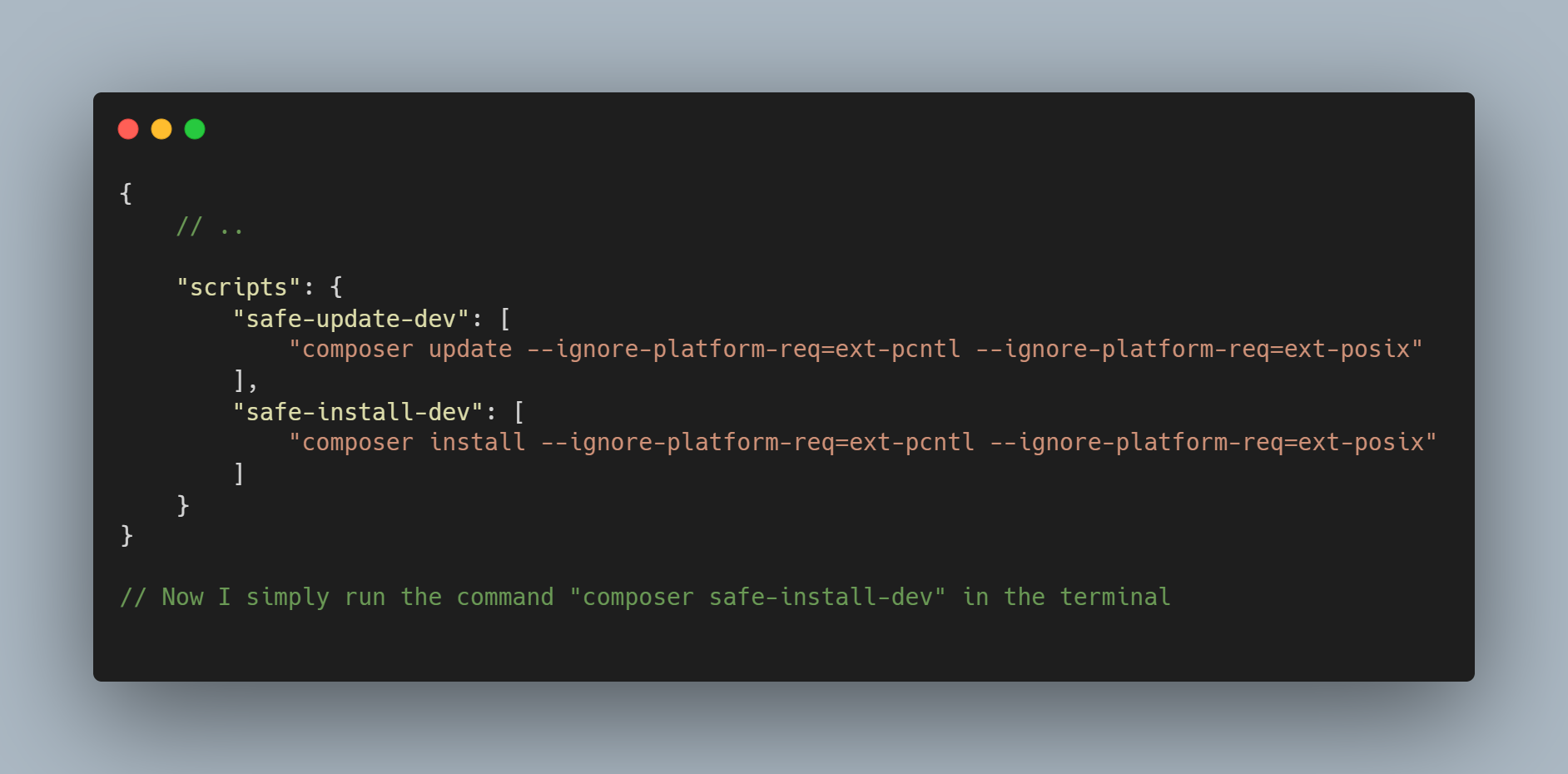
<p>I added a script to composer.json to ease this:</p>

<p><img src="/images/uploads/composer-safely-ignore-a-platform-requirement.png" alt="Safely ignoring platform requirements using Composer v2" /></p>

<p>As seen above, to ignore multiple platform requirements you use the `–ignore-platform-req` multiple times.</p>

<h2 id="further-reading"><a name="further-reading"></a>Further reading</h2>

<ul>
  <li>
    <p><a href="https://php.watch/articles/composer-ignore-platform-req">How to install Composer packages ignoring PHP version requirements</a></p>
  </li>
  <li>
    <p><a href="https://stackoverflow.com/a/67033761/6924437">Stackoverflow answer - A new feature in Composer v2 allows you to selectively ignore platform requirements</a></p>
  </li>
  <li>
    <p><a href="https://getcomposer.org/doc/03-cli.md">Composer v2 documentation</a></p>
  </li>
</ul>]]></content><author><name>Leonel Elimpe</name></author><category term="PHP" /><category term="Composer" /><summary type="html"><![CDATA[I’ve learned the hard way that blindly using Composer’s --ignore-platform-reqs can lead to issues like the downloading of package versions that are not compatible with your PHP version. I am on PHP 7.4 but packages using PHP 8 features were being downloaded, leading to this error:]]></summary><media:thumbnail xmlns:media="http://search.yahoo.com/mrss/" url="https://www.leonelngande.com/images/uploads/ngande-consulting-linkedin-cover.png" /><media:content medium="image" url="https://www.leonelngande.com/images/uploads/ngande-consulting-linkedin-cover.png" xmlns:media="http://search.yahoo.com/mrss/" /></entry><entry><title type="html">Install Laravel Horizon in Laravel 7</title><link href="https://www.leonelngande.com/install-laravel-horizon-in-laravel-7/" rel="alternate" type="text/html" title="Install Laravel Horizon in Laravel 7" /><published>2021-11-24T00:00:00+00:00</published><updated>2021-11-24T05:50:53+00:00</updated><id>https://www.leonelngande.com/install-laravel-horizon-in-laravel-7</id><content type="html" xml:base="https://www.leonelngande.com/install-laravel-horizon-in-laravel-7/"><![CDATA[<p>To install Laravel Horizon in Laravel 7, run below command in your terminal:</p>

<p><code class="language-plaintext highlighter-rouge">composer require laravel/horizon "^4.0"</code>.</p>

<p>If you are using Windows and get the error <code class="language-plaintext highlighter-rouge">Problem 1
    - laravel/horizon[v4.0.0, ..., 4.x-dev] require ext-pcntl * -&gt; it is missing from your system. Install or enable PHP's pcntl extension.
    - Root composer.json requires laravel/horizon ^4.0 -&gt; satisfiable by laravel/horizon[v4.0.0, ..., 4.x-dev].</code>, use the below command instead:</p>

<p><code class="language-plaintext highlighter-rouge">composer require laravel/horizon "^4.0" --ignore-platform-reqs</code></p>

<p>Also note that from this point on when using Windows, you may have to add <code class="language-plaintext highlighter-rouge">--ignore-platform-reqs</code> on all subsequent composer commands if not they will fail. See <a href="https://stackoverflow.com/a/52778992/6924437">this Stackoverflow answer</a> if you will like to skip adding this every time.</p>]]></content><author><name>Leonel Elimpe</name></author><category term="Laravel Horizon" /><summary type="html"><![CDATA[To install Laravel Horizon in Laravel 7, run below command in your terminal:]]></summary><media:thumbnail xmlns:media="http://search.yahoo.com/mrss/" url="https://www.leonelngande.com/images/uploads/ngande-consulting-linkedin-cover.png" /><media:content medium="image" url="https://www.leonelngande.com/images/uploads/ngande-consulting-linkedin-cover.png" xmlns:media="http://search.yahoo.com/mrss/" /></entry><entry><title type="html">Query Records Created Between Two Dates in Laravel</title><link href="https://www.leonelngande.com/query-records-created-between-two-dates-in-laravel/" rel="alternate" type="text/html" title="Query Records Created Between Two Dates in Laravel" /><published>2021-06-10T00:00:00+00:00</published><updated>2021-06-10T04:56:22+00:00</updated><id>https://www.leonelngande.com/query-records-created-between-two-dates-in-laravel</id><content type="html" xml:base="https://www.leonelngande.com/query-records-created-between-two-dates-in-laravel/"><![CDATA[<p>I have been trying to query records created between the start of the current month and the current date and time. If the current time is <code class="language-plaintext highlighter-rouge">2021-06-10 16:11:04</code>, the query should return records created between <code class="language-plaintext highlighter-rouge">2021-05-01</code> and this time.</p>

<p>Initial attempts using <code class="language-plaintext highlighter-rouge">whereDate()</code> all gave inaccurate results.</p>

<div class="language-php highlighter-rouge"><div class="highlight"><pre class="highlight"><code><span class="cp">&lt;?php</span>

<span class="nc">ModelName</span><span class="o">::</span><span class="nf">query</span><span class="p">()</span>
    <span class="o">-&gt;</span><span class="nf">whereDate</span><span class="p">(</span>
        <span class="s1">'created_at'</span><span class="p">,</span>
        <span class="s1">'&gt;='</span><span class="p">,</span>
        <span class="p">(</span><span class="k">new</span> <span class="nc">Carbon</span><span class="p">(</span><span class="s1">'first day of last month'</span><span class="p">))</span><span class="o">-&gt;</span><span class="nf">toDateString</span><span class="p">()</span>
    <span class="p">)</span>
    <span class="o">-&gt;</span><span class="nf">whereDate</span><span class="p">(</span>
        <span class="s1">'created_at'</span><span class="p">,</span>
        <span class="s1">'&lt;='</span><span class="p">,</span>
        <span class="nf">now</span><span class="p">()</span><span class="o">-&gt;</span><span class="nf">subMonthNoOverflow</span><span class="p">()</span>
    <span class="p">)</span>
    <span class="o">-&gt;</span><span class="nf">get</span><span class="p">();</span>
</code></pre></div></div>

<p>I later found out <code class="language-plaintext highlighter-rouge">whereDate()</code> converts the date to the format <code class="language-plaintext highlighter-rouge">'Y-m-d'</code>  so the time is not considered (see below).</p>

<div class="language-php highlighter-rouge"><div class="highlight"><pre class="highlight"><code><span class="cp">&lt;?php</span>

<span class="k">public</span> <span class="k">function</span> <span class="n">whereDate</span><span class="p">(</span><span class="nv">$column</span><span class="p">,</span> <span class="nv">$operator</span><span class="p">,</span> <span class="nv">$value</span> <span class="o">=</span> <span class="kc">null</span><span class="p">,</span> <span class="nv">$boolean</span> <span class="o">=</span> <span class="s1">'and'</span><span class="p">)</span>
<span class="p">{</span>
    <span class="c1">// ...</span>
    <span class="k">if</span> <span class="p">(</span><span class="nv">$value</span> <span class="k">instanceof</span> <span class="nc">DateTimeInterface</span><span class="p">)</span> <span class="p">{</span>
        <span class="nv">$value</span> <span class="o">=</span> <span class="nv">$value</span><span class="o">-&gt;</span><span class="nf">format</span><span class="p">(</span><span class="s1">'Y-m-d'</span><span class="p">);</span>
    <span class="p">}</span>
    <span class="c1">// ...</span>
<span class="p">}</span>
</code></pre></div></div>

<p>Using <code class="language-plaintext highlighter-rouge">whereBetween()</code> did the trick though! It worked exactly as wanted it to.</p>

<div class="language-php highlighter-rouge"><div class="highlight"><pre class="highlight"><code><span class="cp">&lt;?php</span>

<span class="nc">ModelName</span><span class="o">::</span><span class="nf">query</span><span class="p">()</span>
    <span class="o">-&gt;</span><span class="nf">whereBetween</span><span class="p">(</span>
        <span class="s1">'created_at'</span><span class="p">,</span>
        <span class="p">[</span>
            <span class="p">(</span><span class="k">new</span> <span class="nc">Carbon</span><span class="p">(</span><span class="s1">'first day of last month'</span><span class="p">))</span><span class="o">-&gt;</span><span class="nf">toDateString</span><span class="p">(),</span>
            <span class="nf">now</span><span class="p">()</span><span class="o">-&gt;</span><span class="nf">subMonthNoOverflow</span><span class="p">()</span>
        <span class="p">]</span>
    <span class="p">)</span>
    <span class="o">-&gt;</span><span class="nf">get</span><span class="p">();</span>
</code></pre></div></div>

<p><br /></p>
<h2 id="further-reading">Further reading</h2>

<ul>
  <li><a href="https://stackoverflow.com/a/33361741/6924437">How to query between two dates using Laravel and Eloquent? - Stackoverflow</a></li>
  <li><a href="https://stackoverflow.com/questions/14104304/mysql-select-where-datetime-matches-day-and-not-necessarily-time">MySQL SELECT WHERE datetime matches day (and not necessarily time) - Stackoverflow</a></li>
  <li><a href="https://laravel.com/docs/8.x/queries#additional-where-clauses">whereBetween - Laravel Docs</a></li>
  <li><a href="https://laravel.com/docs/8.x/queries#additional-where-clauses">whereDate - Laravel Docs</a></li>
</ul>]]></content><author><name>Leonel Elimpe</name></author><summary type="html"><![CDATA[I have been trying to query records created between the start of the current month and the current date and time. If the current time is 2021-06-10 16:11:04, the query should return records created between 2021-05-01 and this time.]]></summary><media:thumbnail xmlns:media="http://search.yahoo.com/mrss/" url="https://www.leonelngande.com/images/uploads/ngande-consulting-linkedin-cover.png" /><media:content medium="image" url="https://www.leonelngande.com/images/uploads/ngande-consulting-linkedin-cover.png" xmlns:media="http://search.yahoo.com/mrss/" /></entry><entry><title type="html">Laravel HTTP Client Retry Without Throwing an Exception</title><link href="https://www.leonelngande.com/laravel-http-client-retry-without-throwing-an-exception/" rel="alternate" type="text/html" title="Laravel HTTP Client Retry Without Throwing an Exception" /><published>2021-03-22T00:00:00+00:00</published><updated>2021-03-22T11:31:08+00:00</updated><id>https://www.leonelngande.com/laravel-http-client-retry-without-throwing-an-exception</id><content type="html" xml:base="https://www.leonelngande.com/laravel-http-client-retry-without-throwing-an-exception/"><![CDATA[<p>I used Laravel’s <a href="https://laravel.com/docs/7.x/http-client">HTTP Client</a> <code class="language-plaintext highlighter-rouge">retry()</code> feature for the first time yesterday and was surprised it throws an exception on failure of all retries instead of returning the failure <code class="language-plaintext highlighter-rouge">Illuminate\Http\Client\Response</code> object.</p>

<p>If you make a normal request like:</p>

<div class="language-php highlighter-rouge"><div class="highlight"><pre class="highlight"><code><span class="nv">$response</span> <span class="o">=</span> <span class="nc">Http</span><span class="o">::</span><span class="nf">post</span><span class="p">(</span><span class="mf">...</span><span class="p">);</span>
</code></pre></div></div>

<p>You will always be returned an <code class="language-plaintext highlighter-rouge">Illuminate\Http\Client\Response</code> object, even if a server error or timeout occurs.</p>

<p>However, if you would like you request <a href="https://laravel.com/docs/7.x/http-client#retries">retried</a> <code class="language-plaintext highlighter-rouge">3</code> times as below,</p>

<div class="language-php highlighter-rouge"><div class="highlight"><pre class="highlight"><code><span class="nv">$response</span> <span class="o">=</span> <span class="nc">Http</span><span class="o">::</span><span class="nf">retry</span><span class="p">(</span><span class="mi">3</span><span class="p">,</span> <span class="mi">100</span><span class="p">)</span><span class="o">-&gt;</span><span class="nf">post</span><span class="p">(</span><span class="mf">...</span><span class="p">);</span>
</code></pre></div></div>

<p>an exception will be thrown if the 3 attempts fail, or a timeout occurs. But I just want the response object returned, and after inspecting the exception thrown after the retries, I noticed the response object is attached to it. So I wrote this:</p>

<div class="language-php highlighter-rouge"><div class="highlight"><pre class="highlight"><code><span class="nv">$response</span> <span class="o">=</span> <span class="nf">rescue</span><span class="p">(</span><span class="k">function</span> <span class="p">()</span> <span class="p">{</span>

    <span class="k">return</span> <span class="nc">Http</span><span class="o">::</span><span class="nf">retry</span><span class="p">(</span><span class="mi">3</span><span class="p">,</span> <span class="mi">100</span><span class="p">)</span><span class="o">-&gt;</span><span class="nf">post</span><span class="p">(</span><span class="mf">...</span><span class="p">);</span>

<span class="p">},</span> <span class="k">function</span> <span class="p">(</span><span class="nv">$e</span><span class="p">)</span> <span class="p">{</span>
    
    <span class="k">return</span> <span class="nv">$e</span><span class="o">-&gt;</span><span class="n">response</span><span class="p">;</span>

<span class="p">});</span>
</code></pre></div></div>

<p>With the above <a href="https://laravel.com/docs/7.x/helpers#method-rescue">rescue()</a> wrapper around the HTTP request, I always receive a response object and can safely go ahead to verify its status.</p>

<div class="language-php highlighter-rouge"><div class="highlight"><pre class="highlight"><code><span class="nv">$response</span><span class="o">-&gt;</span><span class="nf">successful</span><span class="p">()</span> <span class="o">:</span> <span class="n">bool</span><span class="p">;</span>
<span class="nv">$response</span><span class="o">-&gt;</span><span class="nf">failed</span><span class="p">()</span> <span class="o">:</span> <span class="n">bool</span><span class="p">;</span>
<span class="nv">$response</span><span class="o">-&gt;</span><span class="nf">serverError</span><span class="p">()</span> <span class="o">:</span> <span class="n">bool</span><span class="p">;</span>
<span class="nv">$response</span><span class="o">-&gt;</span><span class="nf">clientError</span><span class="p">()</span> <span class="o">:</span> <span class="n">bool</span><span class="p">;</span>
</code></pre></div></div>

<p>Hope this was helpful ;-).</p>]]></content><author><name>Leonel Elimpe</name></author><category term="Laravel" /><summary type="html"><![CDATA[I used Laravel’s HTTP Client retry() feature for the first time yesterday and was surprised it throws an exception on failure of all retries instead of returning the failure Illuminate\Http\Client\Response object.]]></summary><media:thumbnail xmlns:media="http://search.yahoo.com/mrss/" url="https://www.leonelngande.com/images/uploads/laravel-http-retry.svg" /><media:content medium="image" url="https://www.leonelngande.com/images/uploads/laravel-http-retry.svg" xmlns:media="http://search.yahoo.com/mrss/" /></entry><entry><title type="html">Livewire: Confirm form submission before proceeding</title><link href="https://www.leonelngande.com/livewire-confirm-form-submission-before-proceeding/" rel="alternate" type="text/html" title="Livewire: Confirm form submission before proceeding" /><published>2021-03-09T00:00:00+00:00</published><updated>2021-03-09T06:39:20+00:00</updated><id>https://www.leonelngande.com/livewire-confirm-form-submission-before-proceeding</id><content type="html" xml:base="https://www.leonelngande.com/livewire-confirm-form-submission-before-proceeding/"><![CDATA[<p>Spent the last couple of hours trying to get this working. Here’s what finally worked:</p>

<div class="language-html highlighter-rouge"><div class="highlight"><pre class="highlight"><code><span class="nt">&lt;div&gt;</span>

    <span class="nt">&lt;form</span> <span class="na">wire:submit.prevent=</span><span class="s">"submit"</span><span class="nt">&gt;</span>

        <span class="nt">&lt;div</span> <span class="na">class=</span><span class="s">"form-group"</span><span class="nt">&gt;</span>
            
            <span class="nt">&lt;input</span> <span class="na">wire:model=</span><span class="s">"username"</span>
                   <span class="na">type=</span><span class="s">"text"</span>
                   <span class="na">name=</span><span class="s">"username"</span>
                   <span class="na">placeholder=</span><span class="s">"Username"</span>
                   <span class="na">value=</span><span class="s">"{{ old('username') }}"</span>
                   <span class="na">class=</span><span class="s">"form-control"</span> <span class="nt">/&gt;</span>

            @error('username') <span class="nt">&lt;span</span> <span class="na">class=</span><span class="s">"text-danger"</span><span class="nt">&gt;</span>{{ $message }}<span class="nt">&lt;/span&gt;</span> @enderror
        <span class="nt">&lt;/div&gt;</span>

        <span class="nt">&lt;button</span> <span class="na">onclick=</span><span class="s">"confirm('Are you sure?!') || event.preventDefault();"</span>
                <span class="na">type=</span><span class="s">"submit"</span><span class="nt">&gt;</span>
            Submit
        <span class="nt">&lt;/button&gt;</span>

    <span class="nt">&lt;/form&gt;</span>
    
<span class="nt">&lt;/div&gt;</span>
</code></pre></div></div>

<p>The most relevant piece being the addition of <code class="language-plaintext highlighter-rouge">onclick="confirm('Are you sure?!') || event.preventDefault();"</code> to the submit button. Also, notice the use of <code class="language-plaintext highlighter-rouge">event.preventDefault()</code> instead of <code class="language-plaintext highlighter-rouge">event.stopImmediatePropagation()</code> as you probably might have seen in many blog posts as well as the Livewire documentation. Something like this:</p>

<div class="language-html highlighter-rouge"><div class="highlight"><pre class="highlight"><code><span class="nt">&lt;button</span> <span class="na">onclick=</span><span class="s">"confirm('Are you sure?!') || event.stopImmediatePropagation();"</span>
        <span class="na">type=</span><span class="s">"submit"</span><span class="nt">&gt;</span>
    Submit
<span class="nt">&lt;/button&gt;</span>
</code></pre></div></div>

<p>For the use case of confirming a form submission, <code class="language-plaintext highlighter-rouge">event.stopImmediatePropagation()</code> doesn’t stop the submit action even if the user does not confirm the operation. <code class="language-plaintext highlighter-rouge">event.preventDefault()</code> does the trick.</p>

<p><code class="language-plaintext highlighter-rouge">event.stopImmediatePropagation()</code> however works perfectly when you are only handling a click event on the button, no submit event.</p>]]></content><author><name>Leonel Elimpe</name></author><category term="Livewire" /><summary type="html"><![CDATA[Spent the last couple of hours trying to get this working. Here’s what finally worked:]]></summary><media:thumbnail xmlns:media="http://search.yahoo.com/mrss/" url="https://www.leonelngande.com/images/uploads/ngande-consulting-linkedin-cover.png" /><media:content medium="image" url="https://www.leonelngande.com/images/uploads/ngande-consulting-linkedin-cover.png" xmlns:media="http://search.yahoo.com/mrss/" /></entry><entry><title type="html">Two Ways to get a Form Input’s Value in Cypress</title><link href="https://www.leonelngande.com/two-ways-to-get-a-form-inputs-value-in-cypress/" rel="alternate" type="text/html" title="Two Ways to get a Form Input’s Value in Cypress" /><published>2021-01-15T00:00:00+00:00</published><updated>2021-01-15T05:25:31+00:00</updated><id>https://www.leonelngande.com/two-ways-to-get-a-form-inputs-value-in-cypress</id><content type="html" xml:base="https://www.leonelngande.com/two-ways-to-get-a-form-inputs-value-in-cypress/"><![CDATA[<p>Given the below form, how do we get any individual input’s value inside a Cypress test?</p>

<div class="language-html highlighter-rouge"><div class="highlight"><pre class="highlight"><code><span class="nt">&lt;form&gt;</span>
    <span class="nt">&lt;input</span> <span class="na">type=</span><span class="s">"text"</span>
           <span class="na">name=</span><span class="s">"code"</span>
           <span class="na">data-cy=</span><span class="s">"code"</span><span class="nt">&gt;</span>
                                
    <span class="nt">&lt;input</span> <span class="na">type=</span><span class="s">"tel"</span>
           <span class="na">name=</span><span class="s">"phone"</span>
           <span class="na">data-cy=</span><span class="s">"phone"</span><span class="nt">&gt;</span>
<span class="nt">&lt;/form&gt;</span>
</code></pre></div></div>

<p><br /></p>

<h2 id="using-cypresss-api-methods">Using Cypress’s API methods</h2>

<p>If you need to hold a reference to the value, you can query it using one of the methods below.</p>

<div class="language-javascript highlighter-rouge"><div class="highlight"><pre class="highlight"><code><span class="nx">cy</span><span class="p">.</span><span class="nf">get</span><span class="p">(</span><span class="dl">'</span><span class="s1">[data-cy=code]</span><span class="dl">'</span><span class="p">).</span><span class="nf">should</span><span class="p">((</span><span class="nx">$input</span><span class="p">)</span> <span class="o">=&gt;</span> <span class="p">{</span>
  <span class="kd">const</span> <span class="nx">value</span> <span class="o">=</span> <span class="nx">$input</span><span class="p">.</span><span class="nf">val</span><span class="p">();</span>
    
  <span class="nx">console</span><span class="p">.</span><span class="nf">log</span><span class="p">(</span><span class="nx">value</span><span class="p">);</span> <span class="c1">// do something with the value</span>
    
<span class="p">})</span>
</code></pre></div></div>

<div class="language-javascript highlighter-rouge"><div class="highlight"><pre class="highlight"><code><span class="nx">cy</span><span class="p">.</span><span class="nf">get</span><span class="p">(</span><span class="dl">'</span><span class="s1">[data-cy=code]</span><span class="dl">'</span><span class="p">).</span><span class="nf">invoke</span><span class="p">(</span><span class="dl">'</span><span class="s1">val</span><span class="dl">'</span><span class="p">).</span><span class="nf">should</span><span class="p">((</span><span class="nx">value</span><span class="p">)</span> <span class="o">=&gt;</span> <span class="p">{</span>

    <span class="nx">console</span><span class="p">.</span><span class="nf">log</span><span class="p">(</span><span class="nx">value</span><span class="p">);</span>

<span class="p">})</span>
</code></pre></div></div>

<p><br /></p>

<h2 id="querying-the-dom">Querying the DOM</h2>

<p>You can also retrieve an input’s value by querying the DOM directly.</p>

<div class="language-javascript highlighter-rouge"><div class="highlight"><pre class="highlight"><code><span class="nx">cy</span><span class="p">.</span><span class="nf">document</span><span class="p">().</span><span class="nf">then</span><span class="p">((</span><span class="nx">doc</span><span class="p">)</span> <span class="o">=&gt;</span> <span class="p">{</span>
    <span class="kd">const</span> <span class="nx">value</span> <span class="o">=</span> <span class="nx">doc</span><span class="p">.</span><span class="nf">querySelector</span><span class="p">(</span><span class="dl">'</span><span class="s1">[data-cy=code]</span><span class="dl">'</span><span class="p">).</span><span class="nx">value</span><span class="p">;</span>
    
    <span class="nx">console</span><span class="p">.</span><span class="nf">log</span><span class="p">(</span><span class="nx">value</span><span class="p">);</span>
<span class="p">});</span>
</code></pre></div></div>

<p>Note that to access the test page’s <a href="https://developer.mozilla.org/en-US/docs/Web/API/Document">document</a>, we have to use the <code class="language-plaintext highlighter-rouge">cy.document()</code> command to obtain a reference. The <code class="language-plaintext highlighter-rouge">document</code> you access as a global belongs to the Cypress runner, but the test page is inside an iFrame which has a different document reference.</p>

<p><br /></p>

<h3 id="further-reading">Further reading</h3>

<ul>
  <li><a href="https://docs.cypress.io/faq/questions/using-cypress-faq.html#How-do-I-get-an-input%E2%80%99s-value">How do I get an input’s value? - Cypress Documentation</a></li>
  <li><a href="https://stackoverflow.com/a/60440805/6924437">document.querySelectorAll doesn’t work in cypress - Stackoverflow</a></li>
</ul>]]></content><author><name>Leonel Elimpe</name></author><category term="Cypress" /><summary type="html"><![CDATA[Given the below form, how do we get any individual input’s value inside a Cypress test?]]></summary><media:thumbnail xmlns:media="http://search.yahoo.com/mrss/" url="https://www.leonelngande.com/images/uploads/ngande-consulting-linkedin-cover.png" /><media:content medium="image" url="https://www.leonelngande.com/images/uploads/ngande-consulting-linkedin-cover.png" xmlns:media="http://search.yahoo.com/mrss/" /></entry><entry><title type="html">Testing File Download Links with Cypress</title><link href="https://www.leonelngande.com/testing-file-download-links-with-cypress/" rel="alternate" type="text/html" title="Testing File Download Links with Cypress" /><published>2021-01-13T00:00:00+00:00</published><updated>2021-01-13T08:14:53+00:00</updated><id>https://www.leonelngande.com/testing-file-download-links-with-cypress</id><content type="html" xml:base="https://www.leonelngande.com/testing-file-download-links-with-cypress/"><![CDATA[<p>Say my homepage contains the below snippet, which allows a user to download vcard files. I’d like to make sure the file download links are valid and point to existing files.</p>

<div class="language-html highlighter-rouge"><div class="highlight"><pre class="highlight"><code><span class="nt">&lt;a</span> <span class="na">href=</span><span class="s">"./assets/vcards/mtn.vcf"</span>
   <span class="na">data-cy=</span><span class="s">"mtn-vcard"</span>
   <span class="na">download</span><span class="nt">&gt;</span>
    Download MTN Vcard
<span class="nt">&lt;/a&gt;</span>
<span class="nt">&lt;a</span> <span class="na">href=</span><span class="s">"./assets/vcards/orange.vcf"</span>
   <span class="na">data-cy=</span><span class="s">"orange-vcard"</span>
   <span class="na">download</span><span class="nt">&gt;</span>
    Download Orange Vcard
<span class="nt">&lt;/a&gt;</span>
</code></pre></div></div>

<p>Here’s how I would accomplish this with Cypress.</p>

<div class="language-javascript highlighter-rouge"><div class="highlight"><pre class="highlight"><code><span class="nf">describe</span><span class="p">(</span><span class="dl">"</span><span class="s2">Home page test</span><span class="dl">"</span><span class="p">,</span> <span class="p">()</span> <span class="o">=&gt;</span> <span class="p">{</span>

  <span class="nf">it</span><span class="p">(</span><span class="dl">"</span><span class="s2">can click on and download the MTN and Orange vcards</span><span class="dl">"</span><span class="p">,</span> <span class="p">()</span> <span class="o">=&gt;</span> <span class="p">{</span>
    <span class="nx">cy</span><span class="p">.</span><span class="nf">visit</span><span class="p">(</span><span class="dl">"</span><span class="s2">/</span><span class="dl">"</span><span class="p">);</span>

    <span class="c1">// 0️⃣</span>
    <span class="nx">cy</span><span class="p">.</span><span class="nf">document</span><span class="p">().</span><span class="nf">then</span><span class="p">((</span><span class="nx">doc</span><span class="p">)</span> <span class="o">=&gt;</span> <span class="p">{</span>
      <span class="c1">// 1️⃣</span>
      <span class="kd">const</span> <span class="nx">mtnVcardUrl</span> <span class="o">=</span> <span class="nx">doc</span><span class="p">.</span><span class="nf">querySelector</span><span class="p">(</span><span class="dl">'</span><span class="s1">[data-cy=mtn-vcard]</span><span class="dl">'</span><span class="p">).</span><span class="nf">getAttribute</span><span class="p">(</span><span class="dl">'</span><span class="s1">href</span><span class="dl">'</span><span class="p">);</span>
      <span class="c1">// 2️⃣</span>
      <span class="nx">cy</span><span class="p">.</span><span class="nf">request</span><span class="p">({</span>
        <span class="na">url</span><span class="p">:</span> <span class="nx">mtnVcardUrl</span><span class="p">,</span>
        <span class="na">encoding</span><span class="p">:</span> <span class="dl">'</span><span class="s1">base64</span><span class="dl">'</span>
      <span class="p">})</span>
        <span class="p">.</span><span class="nf">then</span><span class="p">((</span><span class="nx">response</span><span class="p">)</span> <span class="o">=&gt;</span> <span class="p">{</span>
          <span class="c1">// 3️⃣</span>
          <span class="nf">expect</span><span class="p">(</span><span class="nx">response</span><span class="p">.</span><span class="nx">status</span><span class="p">).</span><span class="nx">to</span><span class="p">.</span><span class="nf">equal</span><span class="p">(</span><span class="mi">200</span><span class="p">);</span>
        <span class="p">});</span>

      <span class="kd">const</span> <span class="nx">orangeVcardUrl</span> <span class="o">=</span> <span class="nx">doc</span><span class="p">.</span><span class="nf">querySelector</span><span class="p">(</span><span class="dl">'</span><span class="s1">[data-cy=orange-vcard]</span><span class="dl">'</span><span class="p">).</span><span class="nf">getAttribute</span><span class="p">(</span><span class="dl">'</span><span class="s1">href</span><span class="dl">'</span><span class="p">);</span>
      <span class="nx">cy</span><span class="p">.</span><span class="nf">request</span><span class="p">({</span>
        <span class="na">url</span><span class="p">:</span> <span class="nx">orangeVcardUrl</span><span class="p">,</span>
        <span class="na">encoding</span><span class="p">:</span> <span class="dl">'</span><span class="s1">base64</span><span class="dl">'</span>
      <span class="p">})</span>
        <span class="p">.</span><span class="nf">then</span><span class="p">((</span><span class="nx">response</span><span class="p">)</span> <span class="o">=&gt;</span> <span class="p">{</span>
          <span class="nf">expect</span><span class="p">(</span><span class="nx">response</span><span class="p">.</span><span class="nx">status</span><span class="p">).</span><span class="nx">to</span><span class="p">.</span><span class="nf">equal</span><span class="p">(</span><span class="mi">200</span><span class="p">);</span>
        <span class="p">});</span>
    <span class="p">});</span>

  <span class="p">})</span>
    
<span class="p">});</span>

</code></pre></div></div>

<ul>
  <li>0️⃣: To access your test page’s document, you should use the <code class="language-plaintext highlighter-rouge">cy.document()</code> command to obtain a reference. The document you access as a global belongs to the Cypress runner, but the test page is inside an iFrame which has a different document reference. Visit this <a href="https://stackoverflow.com/a/60440805/6924437">Stackoverflow answer</a> to learn more.</li>
  <li>1️⃣: Query the MTN vcard and get it’s <code class="language-plaintext highlighter-rouge">href</code>.</li>
  <li>2️⃣: Make an HTTP request with the vcard URL. For more on making http requests, visit the <a href="https://docs.cypress.io/api/commands/request.html#Get-Data-URL-of-an-image">Cypress documentation</a>.</li>
  <li>3️⃣: Make sure the request is successful. You can further read and verify the file extension from the base64 encoded file string in the response body.</li>
</ul>]]></content><author><name>Leonel Elimpe</name></author><category term="Cypress" /><summary type="html"><![CDATA[Say my homepage contains the below snippet, which allows a user to download vcard files. I'd like to make sure the file download links are valid and point to existing files.]]></summary><media:thumbnail xmlns:media="http://search.yahoo.com/mrss/" url="https://www.leonelngande.com/images/uploads/ngande-consulting-linkedin-cover.png" /><media:content medium="image" url="https://www.leonelngande.com/images/uploads/ngande-consulting-linkedin-cover.png" xmlns:media="http://search.yahoo.com/mrss/" /></entry><entry><title type="html">Native Platform Check Without Importing Capacitor</title><link href="https://www.leonelngande.com/native-platform-check-without-importing-capacitor/" rel="alternate" type="text/html" title="Native Platform Check Without Importing Capacitor" /><published>2020-10-13T00:00:00+00:00</published><updated>2020-10-13T10:47:22+00:00</updated><id>https://www.leonelngande.com/native-platform-check-without-importing-capacitor</id><content type="html" xml:base="https://www.leonelngande.com/native-platform-check-without-importing-capacitor/"><![CDATA[<p>I wanted to be able to check the platform my app is running on without importing <a href="https://capacitorjs.com">Capacitor</a>, thereby improving my web build’s bundle size. Capacitor already exposes the following methods for querying the current platform:</p>

<ul>
  <li><code class="language-plaintext highlighter-rouge">Capacitor.getPlatform();</code> // ‘web’, ‘ios’, or ‘android’</li>
  <li><code class="language-plaintext highlighter-rouge">Capacitor.platform;</code> // ‘web’, ‘ios’, or ‘android’</li>
  <li><code class="language-plaintext highlighter-rouge">Capacitor.isNative;</code> // true or false</li>
</ul>

<p>These work as expected, my issue is to use any of these, one has to import <code class="language-plaintext highlighter-rouge">Capacitor</code>, which significantly increases my web build’s bundle size.</p>

<div class="language-typescript highlighter-rouge"><div class="highlight"><pre class="highlight"><code><span class="k">import</span> <span class="p">{</span> <span class="nx">Capacitor</span> <span class="p">}</span> <span class="k">from</span> <span class="dl">'</span><span class="s1">@capacitor/core</span><span class="dl">'</span><span class="p">;</span>

<span class="kd">const</span> <span class="nx">isNative</span> <span class="o">=</span> <span class="nx">Capacitor</span><span class="p">.</span><span class="nx">isNative</span><span class="p">;</span>
</code></pre></div></div>

<p>I’d like to ideally be able to check the current platform without incurring this bundle size increase, especially when I just want to check the platform and I don’t actually use Capacitor plugins etc. To fix this, I ended up using some code copied from <a href="https://github.com/ionic-team/ionic-framework/blob/master/core/src/utils/platform.ts">Ionic Framework’s platform check source code on Github</a>.</p>

<div class="language-typescript highlighter-rouge"><div class="highlight"><pre class="highlight"><code><span class="k">export</span> <span class="kd">const</span> <span class="nx">isNative</span> <span class="o">=</span> <span class="p">()</span> <span class="o">=&gt;</span> <span class="p">{</span>
  <span class="k">return</span> <span class="nf">isCapacitorNative</span><span class="p">(</span><span class="nb">window</span><span class="p">);</span>
<span class="p">};</span>

<span class="cm">/**
 * @see https://github.com/ionic-team/ionic-framework/blob/master/core/src/utils/platform.ts
 */</span>
<span class="kd">const</span> <span class="nx">isCapacitorNative</span> <span class="o">=</span> <span class="p">(</span><span class="nx">win</span><span class="p">:</span> <span class="nx">Window</span><span class="p">):</span> <span class="nx">boolean</span> <span class="o">=&gt;</span> <span class="p">{</span>
  <span class="kd">const</span> <span class="nx">capacitor</span> <span class="o">=</span> <span class="nx">win</span><span class="p">[</span><span class="dl">'</span><span class="s1">Capacitor</span><span class="dl">'</span><span class="p">];</span>
  <span class="k">return</span> <span class="o">!!</span><span class="p">(</span><span class="nx">capacitor</span> <span class="o">&amp;&amp;</span> <span class="nx">capacitor</span><span class="p">.</span><span class="nx">isNative</span><span class="p">);</span>
<span class="p">};</span>
</code></pre></div></div>

<p>This still makes use of the <code class="language-plaintext highlighter-rouge">isNative</code> property on the <code class="language-plaintext highlighter-rouge">Capacitor</code> object to determine the platform, though here we don’t explicitly import <code class="language-plaintext highlighter-rouge">Capacitor</code>. With Capacitor always included in native builds, this should always work as expected.</p>

<p>Here’s a usage example.</p>

<div class="language-typescript highlighter-rouge"><div class="highlight"><pre class="highlight"><code><span class="k">import</span> <span class="p">{</span><span class="nx">RouterModule</span><span class="p">,</span> <span class="nx">Routes</span><span class="p">}</span> <span class="k">from</span> <span class="dl">'</span><span class="s1">@angular/router</span><span class="dl">'</span><span class="p">;</span>
<span class="k">import</span> <span class="p">{</span><span class="nx">NgModule</span><span class="p">}</span> <span class="k">from</span> <span class="dl">'</span><span class="s1">@angular/core</span><span class="dl">'</span><span class="p">;</span>
<span class="k">import</span> <span class="p">{</span><span class="nx">isNative</span><span class="p">}</span> <span class="k">from</span> <span class="dl">'</span><span class="s1">./helpers/is-native</span><span class="dl">'</span><span class="p">;</span>

<span class="k">export</span> <span class="kd">const</span> <span class="nx">webRoutes</span><span class="p">:</span> <span class="nx">Routes</span> <span class="o">=</span> <span class="p">[</span>
  <span class="c1">// Use these routes if a web app</span>
<span class="p">];</span>

<span class="kd">const</span> <span class="nx">nativeRoutes</span><span class="p">:</span> <span class="nx">Routes</span> <span class="o">=</span> <span class="p">[</span>
  <span class="c1">// Use these routes if a native app</span>
<span class="p">];</span>

<span class="kd">const</span> <span class="nx">routes</span> <span class="o">=</span> <span class="nf">isNative</span><span class="p">()</span> <span class="p">?</span> <span class="nx">nativeRoutes</span> <span class="p">:</span> <span class="nx">webRoutes</span><span class="p">;</span>

<span class="p">@</span><span class="nd">NgModule</span><span class="p">({</span>
  <span class="na">imports</span><span class="p">:</span> <span class="p">[</span><span class="nx">RouterModule</span><span class="p">.</span><span class="nf">forRoot</span><span class="p">(</span><span class="nx">routes</span><span class="p">)],</span>
  <span class="na">exports</span><span class="p">:</span> <span class="p">[</span><span class="nx">RouterModule</span><span class="p">],</span>
<span class="p">})</span>
<span class="k">export</span> <span class="kd">class</span> <span class="nc">AppRoutingModule</span> <span class="p">{</span>
<span class="p">}</span>
</code></pre></div></div>

<p><br /></p>

<p>You can check out the Ionic Framework platform check <a href="https://github.com/ionic-team/ionic-framework/blob/master/core/src/utils/platform.ts">source code</a> linked above for more granular solutions to platform checking 🔥.</p>]]></content><author><name>Leonel Elimpe</name></author><summary type="html"><![CDATA[I wanted to be able to check the platform my app is running on without importing Capacitor, thereby improving my web build’s bundle size. Capacitor already exposes the following methods for querying the current platform:]]></summary><media:thumbnail xmlns:media="http://search.yahoo.com/mrss/" url="https://www.leonelngande.com/images/uploads/ngande-consulting-linkedin-cover.png" /><media:content medium="image" url="https://www.leonelngande.com/images/uploads/ngande-consulting-linkedin-cover.png" xmlns:media="http://search.yahoo.com/mrss/" /></entry><entry><title type="html">Create a Seconds-Only PHP DateInterval</title><link href="https://www.leonelngande.com/create-a-10-seconds-php-dateinterval/" rel="alternate" type="text/html" title="Create a Seconds-Only PHP DateInterval" /><published>2020-09-30T00:00:00+00:00</published><updated>2020-09-30T02:15:41+00:00</updated><id>https://www.leonelngande.com/create-a-10-seconds-php-dateinterval</id><content type="html" xml:base="https://www.leonelngande.com/create-a-10-seconds-php-dateinterval/"><![CDATA[<p>I wanted to test an interval was being respected which required me to add a seconds-based interval value to a <a href="https://github.com/briannesbitt/carbon">Carbon</a> date object.</p>

<p>For example, if a record is created now, a new one can only be created in say 10 seconds. Here’s how I did it thanks to <a href="https://www.php.net/manual/en/class.dateinterval.php#102930">this comment</a>:</p>

<div class="language-php highlighter-rouge"><div class="highlight"><pre class="highlight"><code><span class="cp">&lt;?php</span>

<span class="kn">use</span> <span class="nc">Carbon\Carbon</span><span class="p">;</span>

<span class="nv">$interval</span> <span class="o">=</span> <span class="k">new</span> <span class="nc">DateInterval</span><span class="p">(</span><span class="s1">'PT10S'</span><span class="p">);</span>

<span class="nv">$now</span> <span class="o">=</span> <span class="nc">Carbon</span><span class="o">::</span><span class="nf">now</span><span class="p">();</span>

<span class="nv">$nextValidCreationDate</span> <span class="o">=</span> <span class="nv">$now</span><span class="o">-&gt;</span><span class="nf">rawAdd</span><span class="p">(</span><span class="nv">$interval</span><span class="p">);</span>

<span class="k">echo</span> <span class="nv">$now</span><span class="o">-&gt;</span><span class="nf">toDateTimeString</span><span class="p">();</span>
<span class="c1">// "2020-09-30 12:42:41"</span>
<span class="k">echo</span> <span class="nv">$nextValidCreationDate</span><span class="o">-&gt;</span><span class="nf">toDateTimeString</span><span class="p">();</span>
<span class="c1">// "2020-09-30 12:42:51"</span>

<span class="cp">?&gt;</span>
</code></pre></div></div>

<p>Notice 10 seconds was added to <code class="language-plaintext highlighter-rouge">$now</code>. Also, notice the use of <code class="language-plaintext highlighter-rouge">PT10S</code> when created the DateInterval, instead of <code class="language-plaintext highlighter-rouge">P10S</code> which results in an error. It seems when creating time-only DateInterval objects, we have to use <code class="language-plaintext highlighter-rouge">T</code> too, instead of just <code class="language-plaintext highlighter-rouge">P</code>. When using the ISO 8601 duration format, T is the time designator that precedes the time components as explained <a href="https://www.digi.com/resources/documentation/digidocs/90001437-13/reference/r_iso_8601_duration_format.htm">here</a>.</p>

<ul>
  <li><strong>P</strong> is the duration designator (referred to as “period”), and is always placed at the beginning of the duration.</li>
  <li><strong>Y</strong> is the year designator that follows the value for the number of years.</li>
  <li><strong>M</strong> is the month designator that follows the value for the number of months.</li>
  <li><strong>W</strong> is the week designator that follows the value for the number of weeks.</li>
  <li><strong>D</strong> is the day designator that follows the value for the number of days.</li>
  <li><strong>T</strong> is the time designator that precedes the time components.</li>
  <li><strong>H</strong> is the hour designator that follows the value for the number of hours.</li>
  <li><strong>M</strong> is the minute designator that follows the value for the number of minutes.</li>
  <li><strong>S</strong> is the second designator that follows the value for the number of seconds.</li>
</ul>

<p>For example:</p>

<blockquote>
  <p>P3Y6M4DT12H30M5S</p>
</blockquote>

<p>Represents a duration of three years, six months, four days, twelve hours, thirty minutes, and five seconds.</p>

<p><br /></p>

<p>In conclusion, all date-only interval formats must start with <code class="language-plaintext highlighter-rouge">P</code>, e.g. <code class="language-plaintext highlighter-rouge">P3Y</code>, <code class="language-plaintext highlighter-rouge">P6M</code>, <code class="language-plaintext highlighter-rouge">P4D</code>, <code class="language-plaintext highlighter-rouge">P3Y6M4D</code>, and all time-only interval formats must start with <code class="language-plaintext highlighter-rouge">P</code> and <code class="language-plaintext highlighter-rouge">T</code>, e.g. <code class="language-plaintext highlighter-rouge">PT12H</code>, <code class="language-plaintext highlighter-rouge">PT30M</code>, <code class="language-plaintext highlighter-rouge">PT5S</code>, <code class="language-plaintext highlighter-rouge">PT12H30M5S</code>.</p>]]></content><author><name>Leonel Elimpe</name></author><category term="PHP" /><category term="DateInterval" /><summary type="html"><![CDATA[I wanted to test an interval was being respected which required me to add a seconds-based interval value to a Carbon date object.]]></summary><media:thumbnail xmlns:media="http://search.yahoo.com/mrss/" url="https://www.leonelngande.com/images/uploads/ngande-consulting-linkedin-cover.png" /><media:content medium="image" url="https://www.leonelngande.com/images/uploads/ngande-consulting-linkedin-cover.png" xmlns:media="http://search.yahoo.com/mrss/" /></entry><entry><title type="html">Laravel: Only retrieve a specific property from the first matching model</title><link href="https://www.leonelngande.com/laravel-only-retrieve-a-specific-property-from-the-first-matching-model/" rel="alternate" type="text/html" title="Laravel: Only retrieve a specific property from the first matching model" /><published>2020-09-25T00:00:00+00:00</published><updated>2020-09-25T12:47:33+00:00</updated><id>https://www.leonelngande.com/laravel-only-retrieve-a-specific-property-from-the-first-matching-model</id><content type="html" xml:base="https://www.leonelngande.com/laravel-only-retrieve-a-specific-property-from-the-first-matching-model/"><![CDATA[<p>Using Laravel Eloquent, I wanted to only get a specific property - the <code class="language-plaintext highlighter-rouge">id</code> - from the first matching model of my query.</p>

<p>Here’s how I did it:</p>

<div class="language-php highlighter-rouge"><div class="highlight"><pre class="highlight"><code><span class="cp">&lt;?php</span>

<span class="kn">use</span> <span class="nc">App\Promotion</span><span class="p">;</span>

<span class="nv">$promotionId</span> <span class="o">=</span> <span class="nc">Promotion</span><span class="o">::</span><span class="nf">where</span><span class="p">(</span><span class="s1">'code'</span><span class="p">,</span> <span class="s1">'GOOD_DEAL'</span><span class="p">)</span><span class="o">-&gt;</span><span class="nf">pluck</span><span class="p">(</span><span class="s1">'id'</span><span class="p">)</span><span class="o">-&gt;</span><span class="nf">first</span><span class="p">();</span>

<span class="k">echo</span> <span class="nv">$promotionId</span> <span class="c1">// 1</span>
</code></pre></div></div>

<p><br /></p>

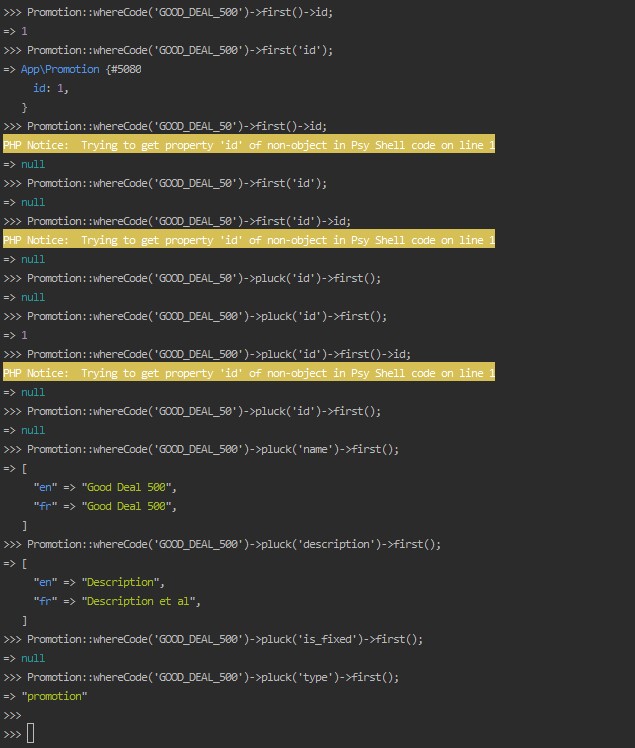
<p>I tried out a good number of eloquent method combinations before arriving at <code class="language-plaintext highlighter-rouge">pluck() + first()</code>.</p>

<p><img src="/images/uploads/select-specific-property-from-query.jpg" alt="nly retrieve a specific property from the first matching model of a query - try outs" /></p>

<p>With respect to the above screenshot, <code class="language-plaintext highlighter-rouge">GOOD_DEAL_500</code> is a valid promotion code and <code class="language-plaintext highlighter-rouge">GOOD_DEAL_50</code> is not.</p>

<p>Of course, I could still just use <code class="language-plaintext highlighter-rouge">Promotion::where('code', 'GOOD_DEAL')-&gt;first()-&gt;id</code>, but this prints out:</p>

<div class="language-plaintext highlighter-rouge"><div class="highlight"><pre class="highlight"><code>PHP Notice:  Trying to get property 'id' of non-object in Psy Shell code on line 1
</code></pre></div></div>

<p>if no promotion is found, I wanted to avoid this 🤷🏻‍♂️.</p>]]></content><author><name>Leonel Elimpe</name></author><category term="Laravel" /><summary type="html"><![CDATA[Using Laravel Eloquent, I wanted to only get a specific property - the id - from the first matching model of my query.]]></summary><media:thumbnail xmlns:media="http://search.yahoo.com/mrss/" url="https://www.leonelngande.com/images/uploads/ngande-consulting-linkedin-cover.png" /><media:content medium="image" url="https://www.leonelngande.com/images/uploads/ngande-consulting-linkedin-cover.png" xmlns:media="http://search.yahoo.com/mrss/" /></entry></feed>